Overview
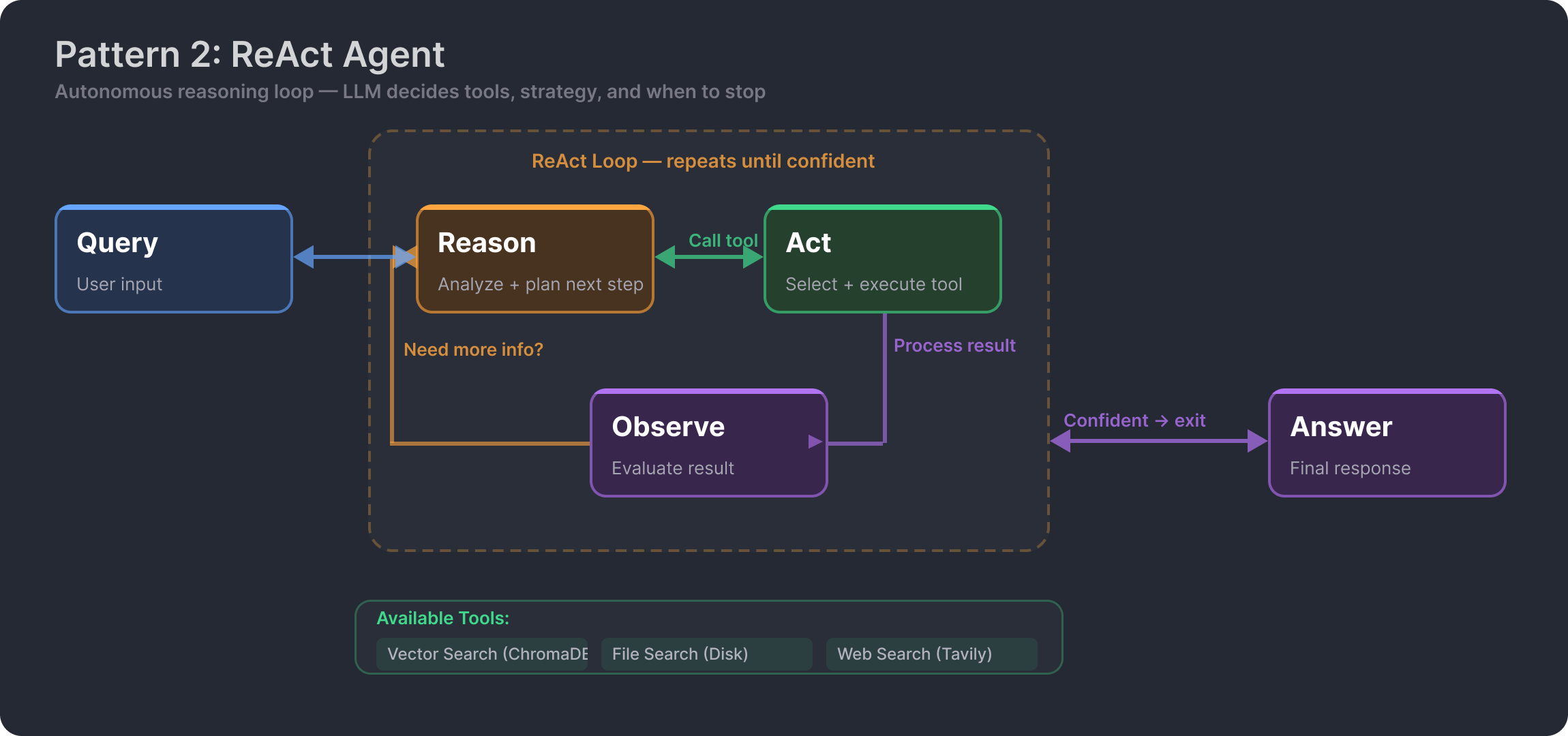
A LlamaIndex ReAct agent that autonomously reasons about which tools to use for any given query. Unlike a fixed pipeline, the LLM itself drives the decision loop — Reason, Act, Observe, Repeat — iterating through available tools until it has gathered enough context to produce a final answer. The agent decides when to search the vector store, grep through files, read full documents, or query the web, all without hard-coded routing logic.
Key Highlights
- ReAct Pattern — Autonomous Reason-Act-Observe loop. The LLM drives tool selection, not hardcoded logic.
- 4 Agent Tools — Vector search, file search, file read, and web search with priority-based selection.
- MCP Server — Exposes ChromaDB to external clients via stdio (Claude Desktop) and SSE (web).
- Live Reasoning Traces — Streamlit UI shows every tool call and result in real time as the agent thinks.
- AgentWorkflow API — Built on LlamaIndex's latest workflow-based agent, not the deprecated ReActAgent class.
- Local Embeddings — nomic-embed-text-v1.5 runs locally despite using Bedrock for inference. Zero embedding cost.
Architecture
How the Agent Thinks
The core of this project is not the retrieval — it is the decision-making. The agent's system prompt encodes a priority-ordered tool selection strategy: try vector search first (semantic understanding), fall back to file search (exact terms), use file read for full context, and only hit the web as a last resort. Critically, the prompt includes a rule: never answer from LLM knowledge alone. Every response must be grounded in tool results.
This means the agent self-corrects. If vector search returns low-relevance results, the agent reasons that it needs a different approach and switches to file grep or web search. If the first tool call is insufficient, it loops again. You can watch this happen in real time through the Streamlit trace panel.
Tools
vector_search
Wraps ChromaDB as a LlamaIndex QueryEngineTool. Unlike the MCP server which returns raw chunks, this tool returns synthesized answers — the LLM generates a response from the top-5 retrieved chunks. Best for conceptual questions about document content.
file_search
Regex-based search across .txt and .docx files in the data directory. Case-insensitive, safe for special characters. Results capped at 20 matches to manage context window. Best for exact terms, names, and numbers that embedding similarity might miss.
file_read
Reads complete file content by filename, truncated at 8,000 characters. Bypasses chunking and embedding entirely — the agent sees the raw document. Best when the agent needs full context rather than isolated chunks.
web_search
Real-time web search returning up to 5 results with title, content, and source URL. Gracefully degrades if no API key is configured. The agent's last resort — used when the answer is not in the local corpus.
Two Access Paths
The system provides two fundamentally different ways to access the knowledge base, each with different behavior:
Through the ReAct agent (Streamlit UI or CLI): The agent reasons about the query, selects tools, and the vector_search tool returns synthesized answers via LlamaIndex's query engine. The LLM processes retrieved chunks and generates a coherent response before the agent even sees it.
Through the MCP server (Claude Desktop or any MCP client): Direct access to ChromaDB returning raw chunks with similarity scores. No agent reasoning, no synthesis — the client LLM handles interpretation. Supports both stdio transport (for Claude Desktop) and SSE transport (for web clients).
This dual-path design means the knowledge base is useful both as an autonomous agent and as a composable tool for other AI systems.
Reasoning Trace Visualization
The Streamlit UI does not just show the final answer — it streams the agent's entire reasoning process in a sidebar panel. Every tool call, every tool result (truncated to 500 characters), and every reasoning step is visible in real time. This makes the ReAct loop observable, not a black box. You can see exactly why the agent chose vector search over file search, and what it found at each step.
Key Design Decisions
LlamaIndex AgentWorkflow (v0.14) — Built on the latest workflow-based agent API rather than the deprecated ReActAgent class. This provides a cleaner interface for defining tools and handling the agent loop with proper async support and event streaming.
BedrockConverse for async streaming — Uses the BedrockConverse LLM adapter which supports async streaming natively, enabling real-time token-by-token output as the agent reasons through its steps.
Local embeddings, cloud inference — Despite using Bedrock Claude for reasoning, embeddings are generated locally with nomic-embed-text-v1.5 via HuggingFace. This keeps the embedding layer consistent with VaultRAG and eliminates per-query embedding costs.
Priority-based system prompt — The system prompt establishes a clear tool priority order and a hard rule against answering from LLM knowledge alone. This guides the agent toward the most efficient retrieval path without hard-coding the logic in application code.
Relationship to VaultRAG
This project is the agentic evolution of VaultRAG, which implements traditional RAG with hybrid retrieval. Both projects use the same embedding model (nomic-embed-text-v1.5) by design, but share zero code and use different frameworks:
- VaultRAG: LangChain, dual-mode (local + cloud), hybrid retrieval (vector + BM25 + metadata), multimodal
- This project: LlamaIndex, cloud-only inference, single semantic search, but with autonomous tool selection
The trade-off is clear: VaultRAG gives you a more sophisticated retrieval engine. This project gives you a more intelligent query handler. See Evolution of RAG for the full comparison of both patterns.